

Hi everyone,
I published a new extension that you can try.
It's called Live Dashlets, a free extension for the EspoCRM dashboard : key figures with their trend, goals with a progress bar and a to-do list for the day. You add them in one click, and every figure respects the access rights of the person looking at it.

What it adds

Permissions
Every figure is computed with the viewer's own access rights, the same way as list views: two people can see different numbers on the same tile. Fields a user cannot read are never used. Nothing leaves your EspoCRM: no external service, no tracking.
Info and download (v1.6.1 as I published this post ) :
More info on https://github.com/AlexisSantin/espocrm-live-dashlets/
Download latest release (ZIP) on GitHub.
Tested on EspoCRM 10.0.3 and 10.0.11.
English and French. License: AGPL-3.0.
My favorite dashlets are what happened and next actions.
As always feel free to share ideas and bugs !
I published a new extension that you can try.
It's called Live Dashlets, a free extension for the EspoCRM dashboard : key figures with their trend, goals with a progress bar and a to-do list for the day. You add them in one click, and every figure respects the access rights of the person looking at it.
What it adds
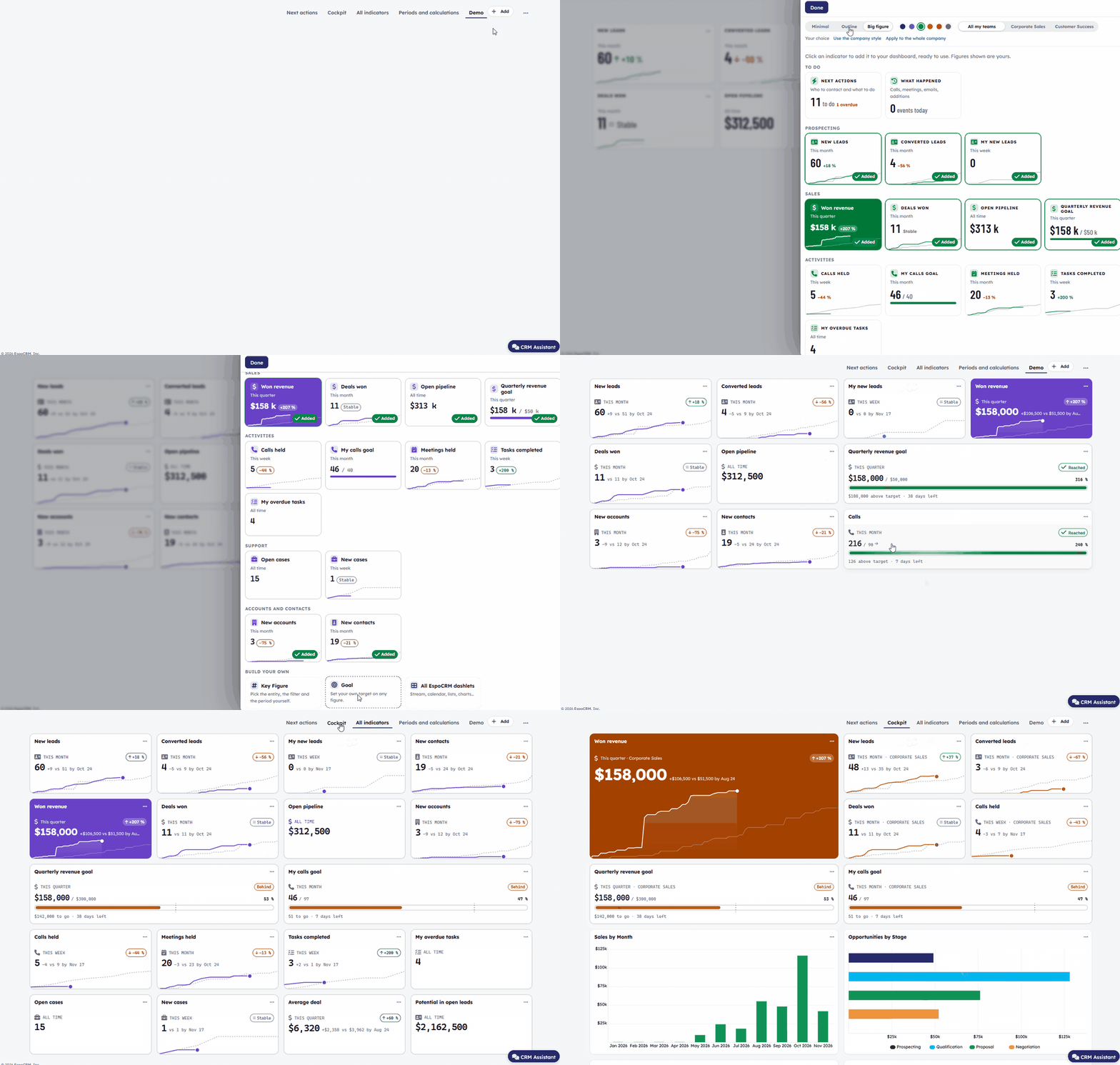
- A gallery of ready-made indicators. A "+ Add" button opens 16 indicators (new leads, won revenue, calls held, open cases…), each previewed with your real figure. One click puts it on the dashboard, already set up.
- Key Figure and Goal dashlets. Choose the entity, the filter, what to count or add up, the period and the comparison, without writing code. Each tile shows its change against the same point of the previous period, as a badge and as a curve. A click lists the records behind the figure.
- Next Actions. A to-do list for the day: overdue tasks, calls to make, new leads never contacted, deals going quiet, meetings without a next step. Each row says why (the task's details, the last exchange about a deal…) and has its button: call, complete, postpone. Every action can be undone.
- What happened. Calls, meetings, emails, new contacts and deals won or lost, for you, your team or everyone you can see.
- One style for the whole dashboard. Minimal, Outline or Big figure, and a color, chosen once. The administrator sets the company's style, and each user can pick their own.
- One team at a time. Users in several teams can look at the figures of one of them.
- Dashboard templates that look like the dashboard. In Administration → Dashboard Templates, a template is shown and edited like the dashboard itself. Deploy to Everyone gives it to all users in one click, without duplicating their tabs.
Permissions
Every figure is computed with the viewer's own access rights, the same way as list views: two people can see different numbers on the same tile. Fields a user cannot read are never used. Nothing leaves your EspoCRM: no external service, no tracking.
Info and download (v1.6.1 as I published this post ) :
More info on https://github.com/AlexisSantin/espocrm-live-dashlets/
Download latest release (ZIP) on GitHub.
Tested on EspoCRM 10.0.3 and 10.0.11.
English and French. License: AGPL-3.0.
My favorite dashlets are what happened and next actions.
As always feel free to share ideas and bugs !

Comment