

| Google Integration EspoCRM version: |
1.6.0 7.5.6 |
-
Recently I bouht the google extension. Everything is connected, but there is no sychronisation between google calendar en EspoCRM. Please help -
Hi peter64,
Do you configure Google integration step by step as described in documentation?
Do you configure crontab?

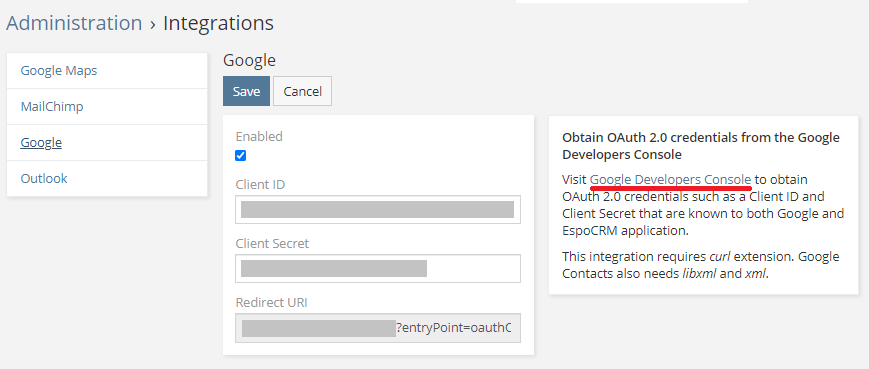
Please provide EspoCRM error log, screenshots of Administration -> Extensions, Administration -> Integrations ->
Google, External Accounts -> Google to investigate this issue comprehensively.
-
Hello Vadym,
De setup for Google integration is configurated as described in the documentation. The crontab is set to receive and sent e-mail. That works. If I have setup another crontab for syncing a google calendar, I like to hear from you.. I have included some schreenshots to verify. Further you have to know yhat I'm running EspoCRM on Plesk Obsidian 18.0.56Last edited by peter64; 11-26-2023, 09:43 AM.Comment
-
Do you have anything in logs?Comment
-
[2023-11-26 09:22:45] ERROR: (0) Could not get stream for non-existing 'data/upload/655de5c1d90c8c116'.; GET /crm/; line: 83, file: /var/www/vhosts/intwee.nl/httpdocs/crm/application/Espo/Core/FileStorage/Storages/EspoUploadDir.php
[2023-11-26 09:23:11] ERROR: (0) Could not get stream for non-existing 'data/upload/65521f39e337ee6b9'.; GET /crm/; line: 83, file: /var/www/vhosts/intwee.nl/httpdocs/crm/application/Espo/Core/FileStorage/Storages/EspoUploadDir.php
[2023-11-26 09:34:47] ERROR: (0) Could not get stream for non-existing 'data/upload/65521f39e337ee6b9'.; GET /crm/; line: 83, file: /var/www/vhosts/intwee.nl/httpdocs/crm/application/Espo/Core/FileStorage/Storages/EspoUploadDir.php
[2023-11-26 09:34:55] ERROR: (0) Could not get stream for non-existing 'data/upload/65521f39e337ee6b9'.; GET /crm/; line: 83, file: /var/www/vhosts/intwee.nl/httpdocs/crm/application/Espo/Core/FileStorage/Storages/EspoUploadDir.php
[2023-11-26 09:35:34] ERROR: (0) Could not get stream for non-existing 'data/upload/65521f39e337ee6b9'.; GET /crm/; line: 83, file: /var/www/vhosts/intwee.nl/httpdocs/crm/application/Espo/Core/FileStorage/Storages/EspoUploadDir.php
[2023-11-26 15:03:49] WARNING: (404) GET /crm/; line: 73, file: /var/www/vhosts/intwee.nl/httpdocs/crm/application/Espo/EntryPoints/Attachment.php
[2023-11-26 15:03:49] WARNING: (404) GET /crm/; line: 73, file: /var/www/vhosts/intwee.nl/httpdocs/crm/application/Espo/EntryPoints/Attachment.php
[2023-11-26 15:03:49] WARNING: (404) GET /crm/; line: 189, file: /var/www/vhosts/intwee.nl/httpdocs/crm/application/Espo/EntryPoints/Image.php
[2023-11-26 15:03:49] WARNING: (404) GET /crm/; line: 189, file: /var/www/vhosts/intwee.nl/httpdocs/crm/application/Espo/EntryPoints/Image.php
[2023-11-26 15:03:54] WARNING: (404) GET /crm/; line: 73, file: /var/www/vhosts/intwee.nl/httpdocs/crm/application/Espo/EntryPoints/Attachment.php
[2023-11-26 15:03:54] WARNING: (404) GET /crm/; line: 189, file: /var/www/vhosts/intwee.nl/httpdocs/crm/application/Espo/EntryPoints/Image.php
[2023-11-26 15:03:54] WARNING: (404) GET /crm/; line: 73, file: /var/www/vhosts/intwee.nl/httpdocs/crm/application/Espo/EntryPoints/Attachment.php
[2023-11-26 15:03:54] WARNING: (404) GET /crm/; line: 189, file: /var/www/vhosts/intwee.nl/httpdocs/crm/application/Espo/EntryPoints/Image.php
[2023-11-26 15:04:02] WARNING: (404) GET /crm/; line: 189, file: /var/www/vhosts/intwee.nl/httpdocs/crm/application/Espo/EntryPoints/Image.php
[2023-11-26 15:04:02] WARNING: (404) GET /crm/; line: 73, file: /var/www/vhosts/intwee.nl/httpdocs/crm/application/Espo/EntryPoints/Attachment.php
[2023-11-26 15:04:02] WARNING: (404) GET /crm/; line: 189, file: /var/www/vhosts/intwee.nl/httpdocs/crm/application/Espo/EntryPoints/Image.php
[2023-11-26 15:04:02] WARNING: (404) GET /crm/; line: 73, file: /var/www/vhosts/intwee.nl/httpdocs/crm/application/Espo/EntryPoints/Attachment.php
[2023-11-26 18:16:30] ERROR: (403) Error after requesting GET https://people.googleapis.com/v1/contactGroups. Reason: People API has not been used in project 771607582115 before or it is disabled. Enable it by visiting https://console.developers.google.co...t=771607582115 then retry. If you enabled this API recently, wait a few minutes for the action to propagate to our systems and retry.; GET /GoogleContacts/action/usersContactsGroups; line: 29, file: /var/www/vhosts/intwee.nl/httpdocs/crm/application/Espo/Modules/Google/Core/Google/Exceptions/RequestError.php
The last error: I enabled peaople.googleapis.comLast edited by peter64; 11-27-2023, 02:34 PM.
-
-
Hi peter64,
1. Please publish your Google app by clicking PUBLISH APP at console.cloud.google.com:
2. Reconnect Google integration (Administration -> Integrations -> Google).
3. Enable and configure Google integration external account for admin, rebuild EspoCRM, and recheck the issue:
Documentation:
https://docs.espocrm.com/extensions/google-integration/calendar/#google-integration-calendar-syncComment
-
Hello
I have a similar problem: not everything is synchronized in Google Calendar and vice versa.
- the Programs entity (this is the edited Meetings) is synchronized from Espo to Google, but vice versa - no.
- the custom Education entity (type - Event) - does not synchronize at all
- Tasks - even not available
Please tell me what I missed?- configured the integration according to the instructions
- configured the Calendar specifically
- Espo Version 9.2.7
- Google Integration Version 1.8.4
Screenshots also providing
Attached FilesLast edited by bshumylo; 02-07-2026, 09:16 PM.Comment
-
I found the reason why the custom entity Education is not displayed in the Espo calendar. It is because the responsible person (Lecturer) is not specified. This is because Espo only shows events assigned to a specific user in the calendar (as far as I know).
So the question is: when creating an event in Google Calendar, how do I assign it to myself so that it appears in the Espo calendar?Attached FilesComment
-
-
Any events are synchronized by default for the User whose profile was connected to Google Calendar using this User's External Account. That is, you don't need to do anything with this.So the question is: when creating an event in Google Calendar, how do I assign it to myself so that it appears in the Espo calendar?
- Most likely, you haven't added the entity you need to display in the "#Calendar" entity:
- In your Google Calendar settings, you have specified "#Meeting" as the default entity. This means that any event from Google Calendar will be created in "#Meeting". So in the EspoCRM Calendar settings (from the screenshot above) you should check the presence of a check mark for "#Meeting".
- In Administration > Settings > General > Activities > Calendar Entity List check the "#Meeting" entity.
Comment
-
Thank u for the answers
- everything was turned on here. "Programs" are renamed "Meetings".- Most likely, you haven't added the entity you need to display in the "#Calendar" entity:
- it was already there- In Administration > Settings > General > Activities > Calendar Entity List check the "#Meeting" entity.
For better understanding customization:
This issue solved somehow... i didn't do nothingthe Programs entity (this is the edited Meetings) is synchronized from Espo to Google, but vice versa - no
But i didn't understand from the Documentation, how to create events from Google Calendar in my "#CDPLecture". Please explain the logic.any event from Google Calendar will be created in "#Meeting"
And Tasks - are they avaliable in any way for sinc?Comment
-
Events from Google Calendar are synced to only one entity in your External Account > Google > Default Entity settings.
That's right, this entity does not sync with Google Calendar. You should choose another one (possibly a custom one) instead.And Tasks - are they avaliable in any way for sinc?Comment
-
Please note that the entity list for each time period (Month, Week, Day, Timeline) is displayed separately.
Your screenshot shows Week. Check if "#CDPLecture" is checked for the weekly calendar.
It is possible that you have checked the "#CDPLecture" checkboxes in all Calendar time slots except Week. Check for the problematic entry not in the EspoCRM calendar, but also in the "#CDPLecture" entity.
Additionally, check all the tips above in this topic and reconnect the current External Account (preferably through an incognito browser tab to avoid problems with the browser cache).Comment
-
Thank you for your answers, Victor
1.Checked - all entities are enabled everywhere.Check if "#CDPLecture" is checked for the weekly calendar.
2.What exactly should I pay attention to? I compared the settings with the "#Meeting" entity — almost everything is similar, except for search filters and portal-related functions, but they are not used.Check for the problematic entry not in the EspoCRM calendar, but also in the "#CDPLecture" entity.
3.Cleared the browser cache. Did everything again in incognito mode according to the instructions and advices above. As a result, the "#CDPLecture" custom entity syncs from Espo to Google, but not vice versa.Additionally, check all the tips above in this topic and reconnect the current External Account (preferably through an incognito browser tab to avoid problems with the browser cache).
Is something else, what i missed?Comment
-
Finally, a solution was found
Everything was configured correctly on Google's side. The reason was in the following:- in the default entity settings for synchronization, you need to uncheck Multiple Assigned Users. Also, there must be an Assigned User* field in Side Panel Fields layout.
- With permissions in roles, for the Admin, you need to remove all roles (or grant the appropriate role rights according to the documentation).
As a suggestion, please add these configuration features to the documentation, as they are not obvious and may be useful to others in the future.Comment
Comment