
Hi everyone,
I’d like to introduce DOT Live Notes PRO, a dashboard notes extension for keeping reminders, checklists, and team information inside EspoCRM.
Instead of opening a separate window, you can click inside a note and edit it directly in the dashlet.
Personal notes or shared team notes
• Personal mode: keep your own working notes and reminders on your dashboard.
• Shared mode: connect multiple users or dashlets to the same note using a Shared Note Key.
• Shared-note locking: when someone is editing, other users remain in read-only mode until the note is released. This helps prevent accidental overwrites.
Shared mode is designed for controlled editing, not simultaneous Google Docs-style collaboration.
Formatting and everyday editing
• Bold text, headings, and normal text.
• Bullet lists, to-do checklists, and separator lines.
• Markdown-style shortcuts while typing.
• Note color and font options.
• Save and Cancel controls, plus save-on-click-outside behavior.
• An optional setting to automatically remove completed to-do items.
Dashboard note examples
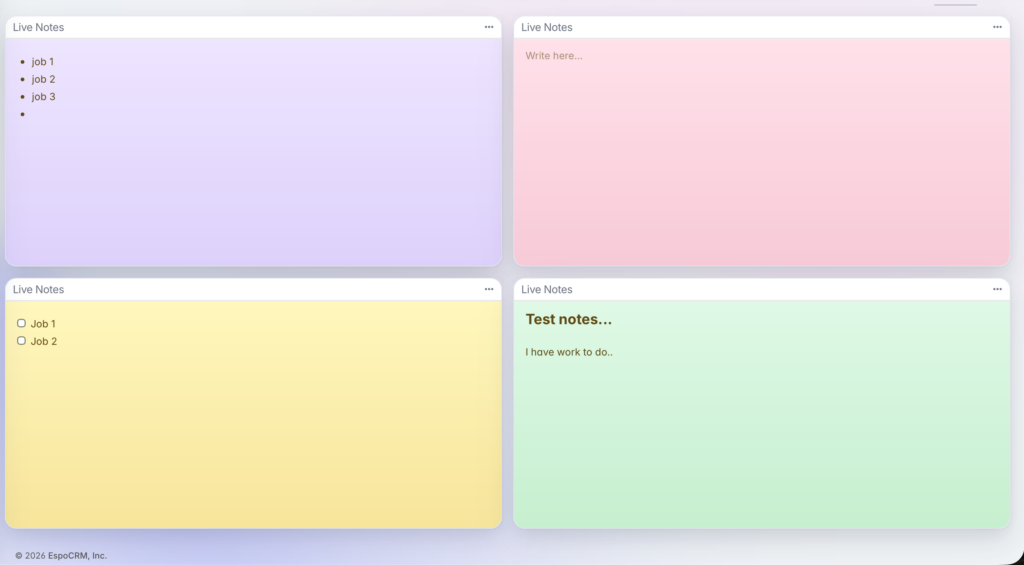
Headings, lists, and checklists
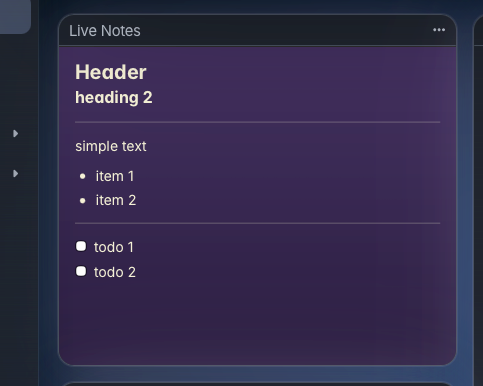
Typical uses
• Personal reminders and daily checklists.
• Shared handover notes for sales or support teams.
• Team instructions and process reminders visible on the dashboard.
• Lightweight working notes without leaving EspoCRM.
Compatibility
DOT Live Notes PRO has been tested with EspoCRM 9.x and 10.x. The current package explicitly supports both version families.
DOT Live Notes PRO is an independent commercial extension by DOT Support, not an official EspoCRM product. It is available as a one-time purchase, with Single Instance and Unlimited Instance licensing options.
More details and licensing options:
DOT Live Notes PRO product page
Feedback and questions about personal or shared dashboard notes are welcome.
— DOT Support
I’d like to introduce DOT Live Notes PRO, a dashboard notes extension for keeping reminders, checklists, and team information inside EspoCRM.
Instead of opening a separate window, you can click inside a note and edit it directly in the dashlet.
Personal notes or shared team notes
• Personal mode: keep your own working notes and reminders on your dashboard.
• Shared mode: connect multiple users or dashlets to the same note using a Shared Note Key.
• Shared-note locking: when someone is editing, other users remain in read-only mode until the note is released. This helps prevent accidental overwrites.
Shared mode is designed for controlled editing, not simultaneous Google Docs-style collaboration.
Formatting and everyday editing
• Bold text, headings, and normal text.
• Bullet lists, to-do checklists, and separator lines.
• Markdown-style shortcuts while typing.
• Note color and font options.
• Save and Cancel controls, plus save-on-click-outside behavior.
• An optional setting to automatically remove completed to-do items.
Dashboard note examples
Headings, lists, and checklists
Typical uses
• Personal reminders and daily checklists.
• Shared handover notes for sales or support teams.
• Team instructions and process reminders visible on the dashboard.
• Lightweight working notes without leaving EspoCRM.
Compatibility
DOT Live Notes PRO has been tested with EspoCRM 9.x and 10.x. The current package explicitly supports both version families.
DOT Live Notes PRO is an independent commercial extension by DOT Support, not an official EspoCRM product. It is available as a one-time purchase, with Single Instance and Unlimited Instance licensing options.
More details and licensing options:
DOT Live Notes PRO product page
Feedback and questions about personal or shared dashboard notes are welcome.
— DOT Support